Chart Trader Panel
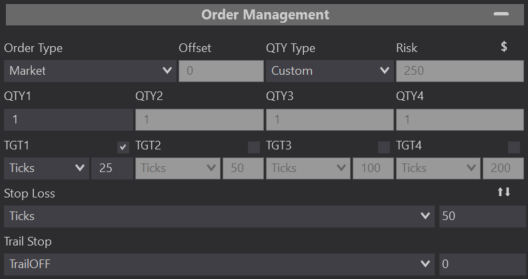
Dollar / Percentage
Split Stop
Stop Loss Value
Stop Loss
Qty 2-4
Target Value
Target
Qty 1-4
Risk
Qty Type
Offset
Order Type
Order Management
Within the Predator Chart Trader Panel, the Order Management section can be expanded to show the same properties that you will find within the Predator Properties. Your strategy can be adjusted however you like now right within the panel instead of opening up the Predator Properties.
Trail Stop
Set your Trail Stop with the click of a button in the order management section of the Chart Trader Panel. You can select between High/Low, ATR, Parabolic, Tick Trail, SuperTrend, or even use a Custom Plot signal from any indicator loaded on your chart.
Trail Stop Value
Set your Trail Stop value here, you can select any value from 0 and beyond. You can even have negative values, just make sure to add the minus sign in front of your value.